
Build a front end by writing a document
star-burxt turns a .sbmx file into a working component — one that renders, responds to clicks,
holds state, fetches, and routes.
A component is markup, and the logic that goes with it, in one file:
:props: count: Int
:!props:

# Counter

The count is {{ to_string(count) }}.

:button: on:click=count + 1
increment
:!button:
You get this:
No build config. No component library. No JavaScript to write. The document is the component.

:section: class=card
    # Today
    :p: child={to_string(model.left) + " left"} :!p:
    :for: task in model.tasks key to_string(task.id)
        :button: class={{ mark(task.done) }} on:click=Msg.Toggle(string_to_int(key, 0))
            {{ task.label }}
        :!button:
    :!for:
:!section:
That screenshot is the real component, running as WebAssembly — clicking a
row runs your update. The other half of the file is Burxt: a Model, a
Msg, and one update function, which
chapter 7 walks through.
Twenty-one of these, all running
Every example in the repository, captured in a browser beside the markup that made it. Drag the strip, or pick one.

:props: model: Model
:!props:

:div: class=bx-card
    :div: class=bx-spread
        :h2: class=bx-title child={"Todos"} :!h2:
        :span: class="bx-badge bx-badge-quiet" child={to_string(len(model.todos)) + " items"} :!span:
    :!div:

    :hr: class=bx-divider :!hr:

    :ul: class=list
        :for: todo in model.todos key to_string(todo.id)
            :li: class=item
                :button: class={{ mark(todo.done) }} on:click=Msg.Toggle(string_to_int(key, 0))
                {{ todo.label }}
                :!button:
            :!li:
        :!for:
    :!ul:

    :div: class=bx-row
        :button: class="bx-btn bx-btn-primary" child={"add one"} on:click=Msg.Add :!button:
    :!div:
:!div:
:props: model: Model
:!props:

:div: class=bx-card
    :div: class=bx-spread
        :h2: class=bx-title child={"Save a draft"} :!h2:
        :span: class="bx-badge bx-badge-quiet" child={to_string(model.hits) + " saves"} :!span:
    :!div:

    :hr: class=bx-divider :!hr:

    :form: on:submit=Msg.Save
        :div: class=field
            :label: class=bx-label child={"What are you writing?"} :!label:
            :input: class=bx-input value={{ model.draft }} on:input=Msg.Typed(value) :!input:
        :!div:
        :button: class="bx-btn bx-btn-primary" child=save :!button:
    :!form:

    :p: class=bx-muted
    draft: {{ model.draft }} — last saved: {{ model.saved }}
    :!p:
:!div:
:props: model: Model
:!props:

:section: class=card
    # Today
    :p: child={to_string(model.left) + " left"} :!p:
    :for: task in model.tasks key to_string(task.id)
        :button: class={{ mark(task.done) }} on:click=Msg.Toggle(string_to_int(key, 0))
            {{ task.label }}
        :!button:
    :!for:
:!section:
:props: model: Model
:!props:

:section: class=card

:div: class=top

# Today

:p:
:span: class=count
{{ to_string(open_count(model.tasks)) }} open
:!span:
of {{ to_string(len(model.tasks)) }} — written as a document, compiled to WebAssembly
:!p:

:!div:

:div: class=row-add

:input: value={{ model.draft }} placeholder="What needs doing?" on:input=Msg.Draft(value)
:!input:

:button: class=add on:click=Msg.Add
Add
:!button:

:!div:

:div: class=tabs

:button: class={{ tab_class(model, "all") }} on:click=Msg.Show("all")
All
:!button:

:button: class={{ tab_class(model, "open") }} on:click=Msg.Show("open")
Open
:!button:

:button: class={{ tab_class(model, "done") }} on:click=Msg.Show("done")
Done
:!button:

:!div:

:if: len(shown(model)) == 0
    :p: class=empty child={"Nothing here. Add something above."} :!p:
:!if:

:ul: class=list

:for: task in shown(model) key to_string(task.id)

:li: class=item

:button: class={{ pick_class(task.done) }} on:click=Msg.Toggle(string_to_int(key, 0))

:span: class=box
:!span:

:span: class=text
{{ task.label }}
:!span:

:!button:

:!li:

:!for:

:!ul:

:div: class=foot

:span:
{{ to_string(open_count(model.tasks)) }} left
:!span:

:button: class=clear on:click=Msg.Clear
Clear done
:!button:

:!div:

:!section:
:props: model: Model
:!props:

# Hello {{ model.user }}

:p:
{{ to_string(model.unread) }} unread
:!p:

:button: on:click=Msg.Clear
clear
:!button:
:props: model: Model
:!props:

# Feed — {{ to_string(model.items) }} items

:button: on:click=Msg.Refresh
refresh
:!button:

:button: on:click=Msg.TogglePolling
toggle polling
:!button:
:props: model: Model
:!props:

# Status — {{ model.status }}

:button: on:click=Msg.Save
save
:!button:
:props: model: Model
:!props:

# Last — {{ model.last }}

:button: class=tap on:click=Msg.Got(value)
tap
:!button:

:input: type=text class=typed on:input=Msg.Got(value)
:!input:

:div: class=wheel on:wheel=Msg.Got(value)
wheel here
:!div:

:div: class=keys on:keydown=Msg.Got(value)
type here
:!div:
:props: model: Model
:!props:

:div: class=bx-card
    :div: class=bx-spread
        :div:
            :h2: class=bx-title child={"Reorder while you type"} :!h2:
            :p: class=bx-muted
            Type in a row, then move it. The caret follows the ROW, because the key says which row it is.
            :!p:
        :!div:
        :span: class="bx-badge bx-badge-quiet" child={to_string(model.moves) + " moves"} :!span:
    :!div:

    :hr: class=bx-divider :!hr:

    :for: row in model.rows key to_string(row.id)
        :div: class=row
            :input: class="bx-input field" value={{ row.text }} on:input=Msg.Typed(string_to_int(key, 0), value)
            :!input:
            :button: class="bx-btn lift" child={"move up"} on:click=Msg.Lift(string_to_int(key, 0)) :!button:
        :!div:
    :!for:
:!div:
:props: model: Model
:!props:

:div: class=bx-card
    :div: class=bx-spread
        :div:
            :h2: class=bx-title child={"A loop inside a loop"} :!h2:
            :p: class=bx-muted child={"64 squares from two nested :for: blocks"} :!p:
        :!div:
        :span: class=bx-badge child={to_string(model.lit) + " lit"} :!span:
    :!div:

    :hr: class=bx-divider :!hr:

    :div: class=board
        :for: row in model.rows key to_string(row.y)
            :div: class=rank
                :for: cell in row.cells key to_string(cell.id)
                    :button: class={{ shade(cell) }} on:click=Msg.Toggle(string_to_int(key, 0)) :!button:
                :!for:
            :!div:
        :!for:
    :!div:
:!div:
:props: model: Model
:!props:

:div: class=bx-card
    :div: class=bx-spread
        :h2: class=bx-title child=Preferences :!h2:
        :span: class="bx-badge bx-badge-quiet" child={summary(model)} :!span:
    :!div:

    :hr: class=bx-divider :!hr:

    :div: class=field
        :label: class=bx-label child=Size :!label:
        :select: class=bx-select on:change=Msg.Size(value)
            :option: value=small selected={{ model.size == "small" }} child=Small :!option:
            :option: value=medium selected={{ model.size == "medium" }} child=Medium :!option:
            :option: value=large selected={{ model.size == "large" }} child=Large :!option:
        :!select:
    :!div:

    :fieldset: class="bx-fieldset field"
        :legend: child=Tone :!legend:
        :div: class=tones
            :label: class=bx-check
                :input: type=radio name=tone value=warm checked={{ model.tone == "warm" }} on:change=Msg.Tone(value) :!input:
                :span: child=Warm :!span:
            :!label:
            :label: class=bx-check
                :input: type=radio name=tone value=cool checked={{ model.tone == "cool" }} on:change=Msg.Tone(value) :!input:
                :span: child=Cool :!span:
            :!label:
        :!div:
    :!fieldset:

    :div: class=field
        :label: class=bx-check
            :input: type=checkbox checked={{ model.agree }} on:change=Msg.Agree(value) :!input:
            :span: child={"I agree to the terms"} :!span:
        :!label:
    :!div:

    :div: class=field
        :label: class=bx-label child=Notes :!label:
        :textarea: class=bx-area on:input=Msg.Note(value)
        {{ model.note }}
        :!textarea:
    :!div:
:!div:
:props: model: Model
:!props:

:div: class=bx-card
    :div: class=bx-spread
        :h2: class=bx-title child={"Draft"} :!h2:
        :span: class="bx-badge bx-badge-quiet" child={model.status} :!span:
    :!div:

    :hr: class=bx-divider :!hr:

    :textarea: class="bx-area draft" on:input=Msg.Typed(value)
    {{ model.text }}
    :!textarea:

    :div: class=bar
        :button: class="bx-btn bx-btn-primary" child=save on:click=Msg.Save :!button:
        :button: class=bx-btn child=restore on:click=Msg.Restore :!button:
        :button: class="bx-btn bx-btn-quiet" child=clear on:click=Msg.Clear :!button:
    :!div:

    :p: class=bx-muted
    It survives a reload — `Store` and `Load` are the browser's own storage, and `clear` puts the caret
    back in the field.
    :!p:
:!div:
:props: model: Model
:!props:

:div: class=bx-card
    :div: class=bx-spread
        :div:
            :h2: class=bx-title child={"Server time"} :!h2:
            :p: class=bx-muted child={to_string(model.ticks) + " ticks, each one asked of the server"} :!p:
        :!div:
        :button: class="bx-btn bx-btn-primary" child={button_text(model)} on:click=Msg.Toggle :!button:
    :!div:

    :hr: class=bx-divider :!hr:

    :p: class=face child={label(model)} :!p:
    :p: class=bx-muted
    A `pure` view cannot read a clock, and a tick carries no payload — so the time comes from where time
    lives.
    :!p:
:!div:
:props: model: Model
:!props:

:div: class=bx-card
    :div: class=bx-spread
        :div:
            :h2: class=bx-title child={"Snake"} :!h2:
            :p: class=bx-muted child={"Arrow keys. A tick, four global keys, and a list that moves every frame."} :!p:
        :!div:
        :span: class=bx-badge child={verdict(model)} :!span:
    :!div:

    :hr: class=bx-divider :!hr:

    :div: class=board
        :for: seg in model.body key to_string(seg.x) + "-" + to_string(seg.y)
            :div: class=seg style={{ at(seg) }} :!div:
        :!for:
        :div: class=food style={{ at(model.food) }} :!div:
    :!div:

    :div: class=bx-row
        :button: class="bx-btn bx-btn-primary" child={"new game"} on:click=Msg.Again :!button:
    :!div:
:!div:
:props: model: Model
:!props:

:div: class=bx-card
    :div: class=bx-spread
        :h2: class=bx-title child=Order :!h2:
        :span: class=bx-badge child={to_string(len(model.lines)) + " lines"} :!span:
    :!div:

    :for: line in model.lines key to_string(line.id)
        :div: class=line
            :button: class="bx-btn bx-btn-icon" child={"−"} on:click=Msg.Fewer(string_to_int(key, 0)) :!button:
            :button: class="bx-btn bx-btn-icon" child={"+"} on:click=Msg.More(string_to_int(key, 0)) :!button:
            :div:
                :div: class=name child={line.name} :!div:
                :div: class=each child={money(line.each) + " each × " + to_string(line.count)} :!div:
            :!div:
            :div: class=amount child={money(line_total(line))} :!div:
        :!div:
    :!for:

    :hr: class=bx-divider :!hr:

    :div: class=sum
        :span: class=bx-muted child={"subtotal " + money(subtotal(model.lines)) + "  ·  service 12.5% " + money(service(model.lines))} :!span:
        :span: class="bx-figure amount" child={money(cart_total(model.lines))} :!span:
    :!div:
:!div:

:div: class=bx-card
    :h2: class=bx-title child={"Split the bill"} :!h2:
    :p: class=bx-muted
    Dividing money cannot lose a penny, so the shares are computed rather than rounded.
    :!p:
    :div: class=bx-row
        :button: class=bx-btn child={"one bill"} on:click=Msg.Split(1) :!button:
        :button: class=bx-btn child={"two ways"} on:click=Msg.Split(2) :!button:
        :button: class=bx-btn child={"three ways"} on:click=Msg.Split(3) :!button:
    :!div:
    :p: class="shares bx-mono" child={shares(model)} :!p:
:!div:
:props: model: Model
:!props:

:div: class=bx-card
    :div: class=bx-spread
        :h2: class=bx-title child={"Noughts and crosses"} :!h2:
        :span: class=bx-badge child={verdict(model)} :!span:
    :!div:

    :hr: class=bx-divider :!hr:

    :div: class=grid
        :for: square in model.squares key to_string(square.id)
            :button: class={{ face(square) }} child={square.mark} on:click=Msg.Play(string_to_int(key, 0)) :!button:
        :!for:
    :!div:

    :div: class=bx-row
        :button: class=bx-btn child={"new game"} on:click=Msg.Again :!button:
    :!div:
:!div:
For anything past a counter, a component has two halves — the markup, and a ===bx section holding
your own Burxt:
===bx
class Item  { id: Int, name: String }
class Model { count: Int, items: [Item] }
enum Msg { Increment, Reset }

pure function update(msg: Msg, m: Model) -> Model {
    match msg {
        Increment => { return Model { count: m.count + 1, items: m.items }; }
        Reset     => { return Model { count: 0, items: m.items }; }
    }
}
===

:props: model: Model
:!props:

# Counter

The count is {{ to_string(model.count) }}.

:button: on:click=Msg.Increment
increment
:!button:
on:click=Msg.Increment names a message, and your update decides what it does. That’s one
function you can read, test, and diff — not a closure that re-runs.
What a component can do
| You write | You get |
|---|---|
# Heading and paragraphs |
headings and paragraphs, as in any Markdown |
{{ total }} |
your data, in the page |
:props: model: Model |
what the component is given |
:button: on:click=Msg.Add |
a button, and your update decides what it does |
:for: item in items key item.id |
a row per item, each with its own buttons |
:match: model.route |
a screen per route — forget one and the build fails |
:if: ready / :else: |
a section that appears when it should |
:Badge: amount={{ n }} |
another component, imported with use |
:span: child={total} :!span: |
a leaf on one line, body and all |
===style.local |
CSS scoped to this component, with no default |
commands and watch |
fetching, timers, websockets — without await |
load |
server rendering, and server code that cannot reach the browser |
That is the whole idea. If you can write a document, you can write an app.
Start with the tour
Six short chapters. By the end you will have built a counter, a form, a list, and a price table, and put them on a real page.
The one thing that will surprise you
star-burxt reads your buttons.
Most frameworks treat what happens on a click as your business — it is a function, it runs, and if it is wrong you find out when a user finds out. Here, a click is checked before the page exists.
Misspell something:
The total is {{ toatl }}
unknown variable: toatl
Try to add a word to a number:
:button: on:click=count + "one"
increment
:!button:
cannot apply `+` to Int and String
Round money without saying how:
:button: on:click=total * 1.5
apply surcharge
:!button:
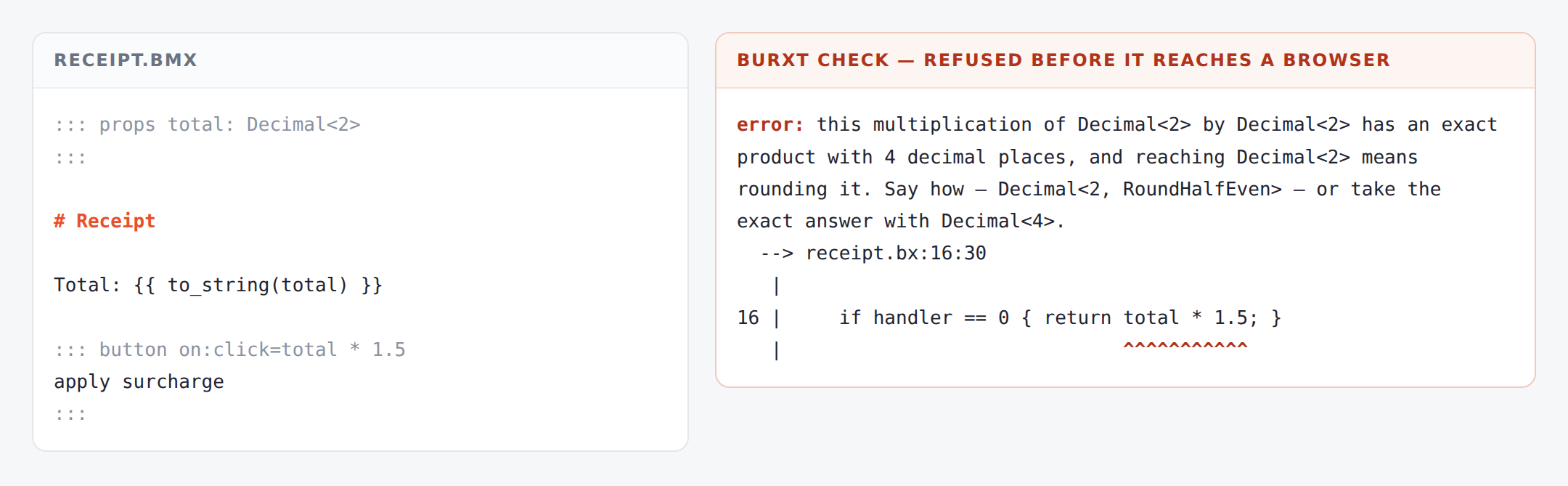
You do not have to know why this works to use it. If you would like to, Burxt is the language underneath and the explanation lives there.
Where to go
- Your first component — start here, it takes ten minutes
- Set up — what to install before chapter one
- How do I…? — short answers to common tasks
- When it says no — every refusal, and what to write instead