3. Buttons and events
Now make it do something.
A button that changes the page
:props: count: Int
:!props:

# Counter

The count is {{ to_string(count) }}.

:button: on:click=count + 1
increment
:!button:
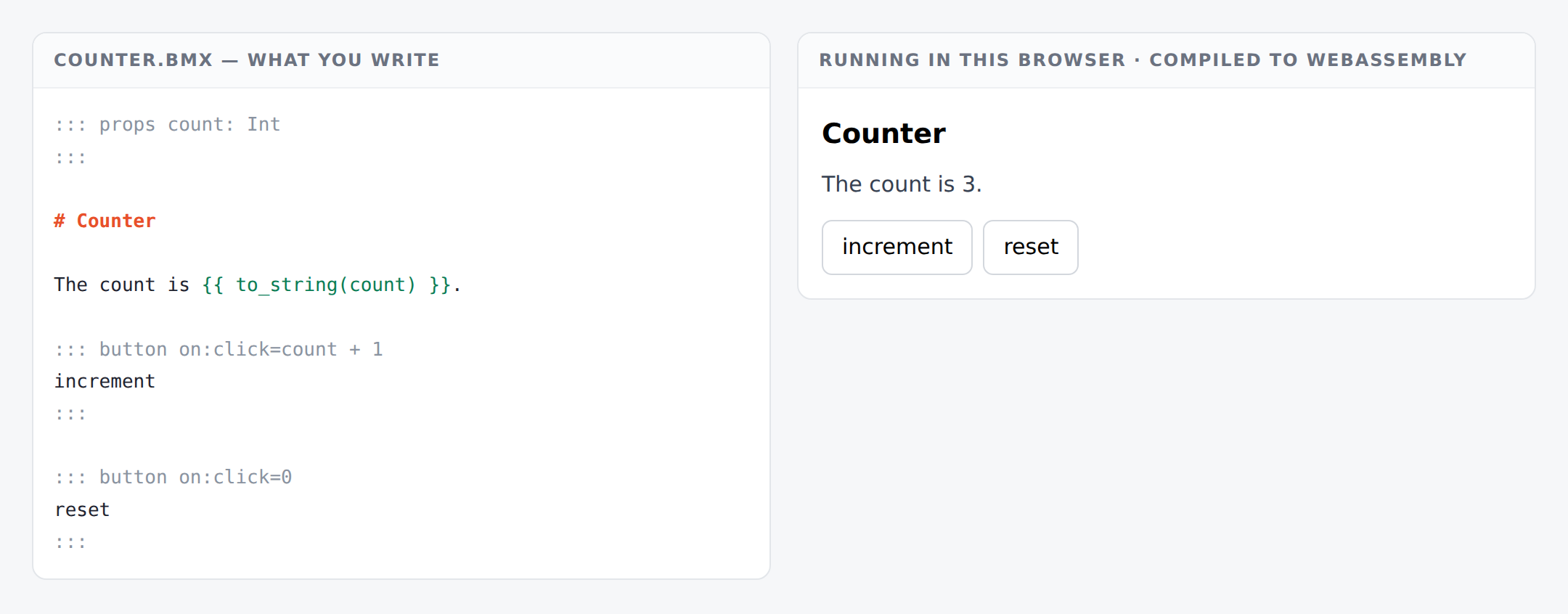
on:click=count + 1 reads as when this is clicked, the count becomes count plus one.
That is the whole model, and it is worth pausing on because it is different from what you may be used to:
You do not write code that changes something. You write what the new value is.
There is no setState, no this.count++, no store to reach into. The old value goes in, the new
value comes out. If you can read the expression, you know what the button does.
Two buttons
:button: on:click=count + 1
increment
:!button:

:button: on:click=count - 1
decrement
:!button:

:button: on:click=0
reset
:!button:
on:click=0 is a button that sets the count to zero. Not decrements to zero — is zero. Once
you see handlers as “the next value”, the reset button stops needing a special case.
Typing in a box
:props: name: String
:!props:

# Hello {{ name }}

:input: on:input=name
:!input:
on:input=name means the new value is whatever was typed. As you type, the heading follows.
The events you can use
Most of them.
Pointer and mouse — click dblclick contextmenu pointerdown pointerup pointermove
pointerenter pointerleave mousedown mouseup mouseenter mouseleave mouseover mouseout
Keyboard — keydown keyup
Forms — input change submit reset focus blur focusin focusout
Dragging — dragstart dragover dragleave drop dragend
Touch — touchstart touchmove touchend
Scrolling — wheel scroll
Animation — animationstart animationend animationiteration transitionstart
transitionend
Ask for one that is not there and you are told, with what to write instead:
`on:hover` is not an event this host can wire. There is no `hover` event —
hovering is CSS. Use `:hover` in a `===style.local` section, or
`on:mouseenter` and `on:mouseleave` if the hover has to change your state.
star refuses an event it cannot deliver, rather than accepting it and doing nothing. A handler that never runs is the worst failure a page can have — nothing is broken, nothing is logged, and you stare at the screen wondering what you got wrong.
Your handlers are checked
Try to add text to a number:
:button: on:click=count + "one"
increment
:!button:
cannot apply `+` to Int and String
Misspell your own prop:
:button: on:click=cont + 1
increment
:!button:
unknown variable: cont
This is the part no other framework does. Everywhere else, what happens on a click is a function that nobody looks inside until it runs. Here it is checked with the rest of your document, and a broken button is a message rather than a bug report.
When one expression is not enough
Everything above puts the whole update in the head of a block. That is fine for a counter and it
runs out quickly — there is nowhere to put a helper, a match, or a name for what happened.
So a real component has two halves. Add a ===bx section and your own Burxt goes in it:
===bx
class Model { count: Int, step: Int }
enum Msg { Increment, Decrement, Reset }

pure function update(msg: Msg, m: Model) -> Model {
    match msg {
        Increment => { return Model { count: m.count + m.step, step: m.step }; }
        Decrement => { return Model { count: m.count - m.step, step: m.step }; }
        Reset     => { return Model { count: 0, step: m.step }; }
    }
}
===

:props: model: Model
:!props:

The count is {{ to_string(model.count) }}.

:button: on:click=Msg.Increment
more
:!button:
on:click=Msg.Increment names a message. It no longer says what the next state is — it says
what happened, and update decides what that means.
Three things change the moment you write a ===bx section:
Your state can be a record. Model { count: Int, step: Int } — as many fields as you need, and
lists in them.
Your update is a function you can read. One match, one branch per message. You can call it from
a test.
Handlers stop being one-liners. Anything you can write in Burxt, you can do in update —
helpers, loops, guards.
The two modes are not a switch you set. The presence of the section is the switch, so a reader can
tell which one a file is in by looking at it. And a ===bx section with no update is refused by
name rather than left to fail as a compiler error about a function nobody wrote.
The value an event carries
An event brings something with it, and it arrives as value:
| the event | value is |
|---|---|
input, change |
what was typed, or true/false for a checkbox |
keydown, keyup |
the key’s name |
| a pointer or mouse event | x,y |
animationend |
the animation’s name |
:input: on:input=Msg.Typed(value)
:!input:
It is text, always — because the boundary between a page and your program is text. Convert it if you
need a number: string_to_int(value, 0).
What you have
on:click=andon:input=take an expression for the next value- most DOM events, including the keyboard, the pointer, dragging and animation
- the expression is checked like the rest of your code
- a
===bxsection gives you messages, a record for state, and anupdateyou can read - every event carries a
value