5. Money
If your screen shows a price, this chapter is the reason to use star-burxt.
Money is its own kind of value
:props: total: Decimal<2>
:!props:

# Receipt

Total: {{ to_string(total) }}
Decimal<2> is a number with exactly two decimal places. Not “a number that usually looks like
money” — exactly two, always, with no rounding you did not ask for.
Use Decimal<2> for currency and Int for counts. 1299.05 stays 1299.05. It will not become
1299.0500000000002, and it will not print as 1299.5.
If you have written a checkout screen before, you know why that sentence needed writing.
Adding up is fine
:props: subtotal: Decimal<2>, shipping: Decimal<2>
:!props:

Total: {{ to_string(subtotal + shipping) }}
Two-decimal money plus two-decimal money is two-decimal money. Nothing to think about.
Multiplying is where it gets interesting
:props: total: Decimal<2>
:!props:

:button: on:click=total * 1.5
apply surcharge
:!button:
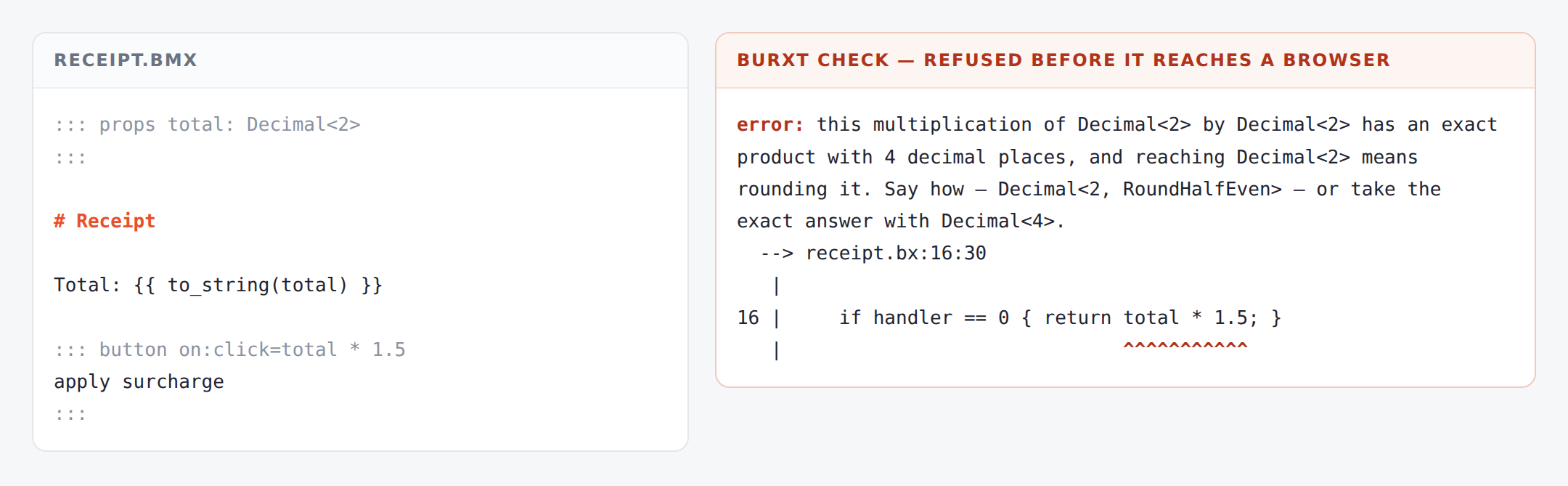
this multiplication of Decimal<2> by Decimal<2> has an exact product with
4 decimal places, and reaching Decimal<2> means rounding it. Say how —
Decimal<2, RoundHalfEven> — or take the exact answer with Decimal<4>.
Read that as a question rather than an error: 1299.05 × 1.5 is 1948.575. You asked for two
decimal places. Should that be 1948.57 or 1948.58?
Both answers are defensible. Both are wrong for somebody. So you are asked, once, in writing.
Answering the question
Round it, and say which way:
:props: total: Decimal<2, RoundHalfEven>
:!props:

:button: on:click=total * 1.5
apply surcharge
:!button:
RoundHalfEven is banker’s rounding — the one accountants expect. RoundHalfUp is the one you
learned at school. Pick the one your business uses, write it down, and it is now visible to everyone
who reads the file.
Or keep the exact answer:
:props: total: Decimal<4>
:!props:
Four decimal places, nothing lost. Round when you present it, not while you are calculating.
Why this is in a front-end framework at all
A page is where money is most often mangled, because a page is where a value gets formatted, and formatting is where rounding sneaks in. The number was right in the database, right in the API, and wrong on the screen.
And a click handler is the worst place of all, because it is code that nobody reads and that runs once, later, on somebody’s laptop. star-burxt checks it with everything else — so a rounding decision cannot be made by accident inside a button.
You will hit this once, on a real price, and the twenty seconds it costs you will be the cheapest twenty seconds of the project.
What you have
Decimal<2>for money,Intfor counts- adding and subtracting need no thought
- multiplying asks you how to round, once
RoundHalfEven,RoundHalfUp, or keep more places